
Proposals // Priced, branded, out the door in minutes.
// Every feature. One price. All In.
The only complete business management platform built for AV integrators.
One subscription that replaces the three to five tools most AV shops run today.
Take the tour.
Start a free trialNo card required
Inventory // Every product, warehouse to van to rack.
The numbers // Know what every job made before the books close.
Customer Portal // One place your client can see.
// Heard on the floor at CEDIA 2026
// Connected to the brands you already love and use





















Everything your customer sees has your name on it. From the first click to years after the job.
// Your brand, everywhere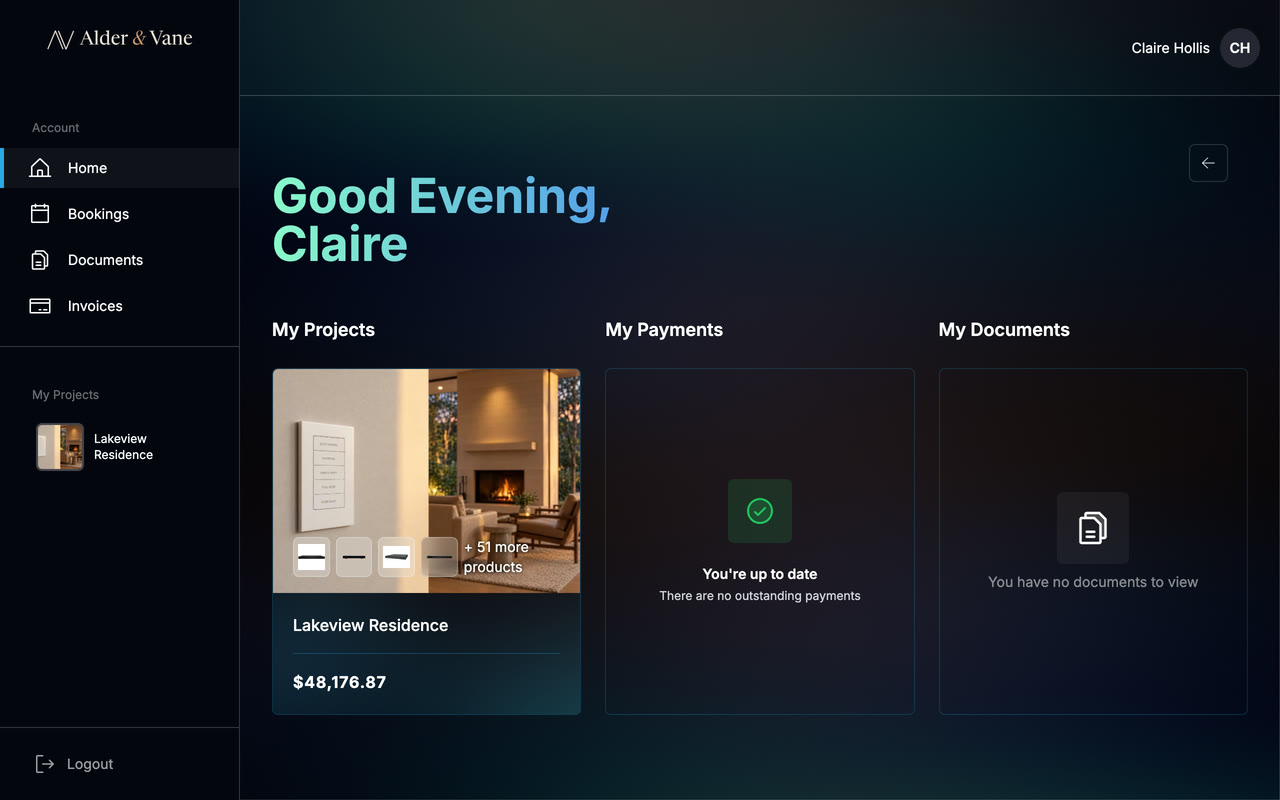
Your customer portal
Private. Their login, your brand.
Secure sign-in · customer.specifi.ioIt all comes from one platform.
How it works.
// Process// 01
Win the Job
Show up polished. Get found. Win the pitch before the site walk. A branded site, marketing automation, a CRM that remembers every conversation, and proposals built from your real product catalog.
// 02
Run the Project
From rough-in to sign-off, every job visible on one board. Stock counted, suppliers in sync, the email thread attached to the right project. No more checking three apps to see where a job stands.
// 03
Manage the Business
Know what every job made before the books close. Invoicing triggered by milestones, work orders out the door from the office, products purchased against the proposal, and hours logged against the right job.
// 04
Deliver the Experience
Sign-off doesn't end the job. It starts the relationship. A branded portal where clients view projects, approve change orders, book service, and pay invoices, and SureBright-backed extended warranty cover that follows the install past the manufacturer's twelve-month expiry. The kind of follow-through that keeps clients calling you first.
// Watch: The Proposal from Specifi
Integrators run their business on Specifi.
// What integrators sayWinner, CEDIA Expo TechStarter Best Start-up
Specifi has completely transformed the way we operate our business. When we switched a year ago, I never would have guessed it would make us more efficient and increase our bottom line as much as it has. We've been blown away by how much effort the Specifi team puts into helping us succeed.
We chose Specifi for its modern interface, streamlined project timelines, and advanced time management and proposal software. Their support is superb, often fixing issues within minutes of them being reported. They're innovating at a much faster pace than others in the space.
Specifi has literally transformed the way we quote and manage projects. The interface is incredibly intuitive and having all our suppliers within one piece of software takes hours off the quoting process.
Most integrators only discover where a job lost money when it is already over. Specifi shows you the margin while there is still time to protect it.
Proposals, purchasing, labor, projects and invoicing working from the same job record. One live figure from quote to completion.
// Included in every plan
Bob knows AV. Bob knows your numbers.
Bob the AI runs on Specifi's own servers. Not a wrapper on ChatGPT, not your data feeding someone else's model. Your clients trust you with their data. We built Bob so you can trust us with yours.
One subscription. Everything included.
// PricingEvery plan includes the full platform. Pick the tier that matches your team size, and see the full list of what is included below the plans. Prices shown in USD; accounts run in GBP, USD, EUR, AUD, NZD or CAD.
Individual
Everything to launch and run your AV business.
$134/ mo$149
Billed annually
- Office users 1 included
- Field users 2 included
- Single-page website Included
- Onboarding $299 one-time
- Two months of your plan, Year 1 only. Two to three sessions, support ongoing.
Recommended
Team
Built for growing crews juggling several jobs at once.
$314/ mo$349
Billed annually
- Office users 3 included
- Field users 5 included
- Single-page website Included
- Onboarding $699 one-time
- Two months of your plan, Year 1 only. Two to three sessions, support ongoing.
Company
Built for multi-crew firms running ten or more jobs at a time.
$629/ mo$699
Billed annually
- Office users 7 included
- Field users 10 included
- Single-page website Included
- Onboarding $1,399 one-time
- Two months of your plan, Year 1 only. Two to three sessions, support ongoing.
See everything included (14 features)Every plan. No add-ons, no per-user surcharges, no integration fees.
Proposals & quotingBranded proposals from first idea to signed off in minutes.
CRM & contact managementEvery lead, every call, every follow-up in one thread.
Single-page website (SEO / AEO)A site that ranks, edits in minutes, and converts.
Echo social mediaSocial scheduling built in: Bob drafts posts off your last install, you schedule Facebook, Instagram and LinkedIn from one calendar.
Inventory managementWarehouse, truck, site. Know where every part is.
Supplier databaseDealer networks and pricing, always up to date.
Email integrationGmail and Outlook threads tied to the job, not the inbox.
Accounting (Xero / QuickBooks)Two-way sync. No duplicate entry, no month-end scramble.
Work ordersScheduled crews, clear scopes, sign-off on site.
Purchase ordersRaise, track, and receive POs without leaving the job.
Time managementTrack labor per job. See where the hours actually go.
Customer portalClients see progress, sign docs, pay online.
Mobile appThe full platform in your pocket, rough-in to sign-off.
Bob the AI assistantYour always-on AV expert. Answers, drafts, reminders.
Prices exclude VAT, GST, US sales tax, and other applicable local taxes unless stated otherwise. Every plan starts with a fourteen-day free trial, no credit card required.
// Specifi
One platform. Every feature. All In.
One platform that catches leads, closes deals, runs projects, and keeps clients.
Start a free trial · No card requiredNot ready? Get a free 41-check audit of your website. Report in your inbox in about three minutes.