Synced. Linked.Actioned.

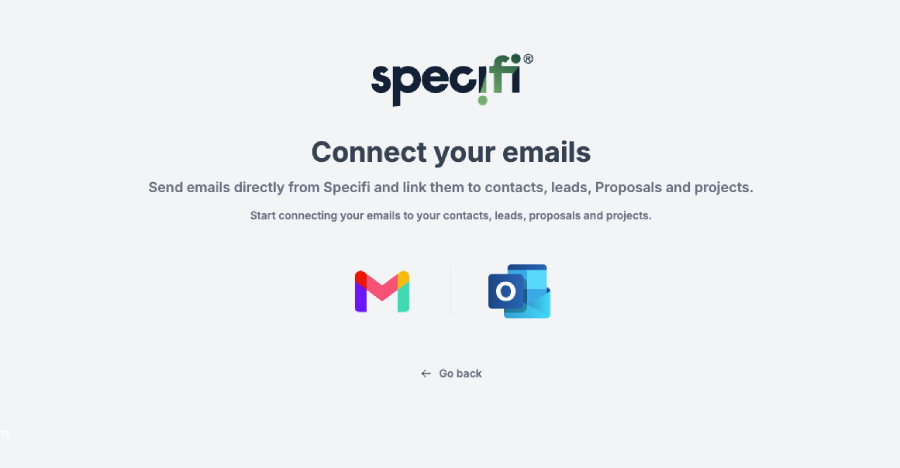
Two-way OAuth sync with Gmail and Outlook 365 attaches inbound mail to the matching CRM contact, with create-from-thread for customers, opportunities, projects, work orders, and invoices. Included on every Specifi plan.

Synced.Linked.Actioned.

Gmail + Outlook 365

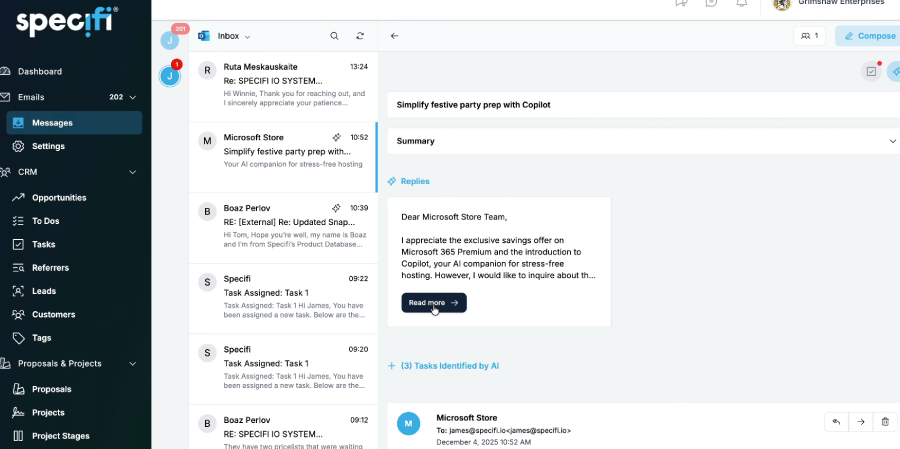
Two-way OAuth sync with Gmail and Outlook 365. Inbound auto-attaches to the matching CRM contact and any linked record (opportunity, project, work order, invoice). Outbound from inside Specifi appears in your sent items as if composed in Gmail or Outlook directly.

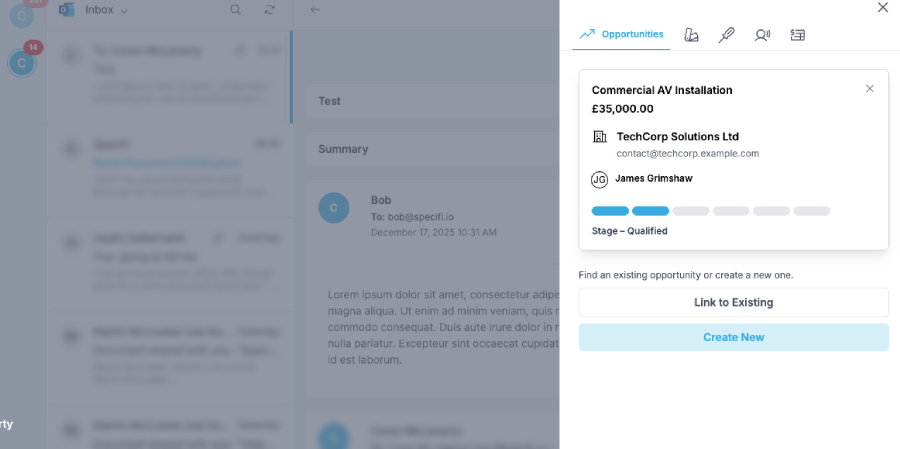
Multi-record thread linking

A single thread can link to one or more existing customers, opportunities, projects, work orders, or invoices simultaneously. Bidirectional: the email shows on every record it links to, and the record context shows on the email. One thread, multiple records, no copy-paste.

Create from inbox

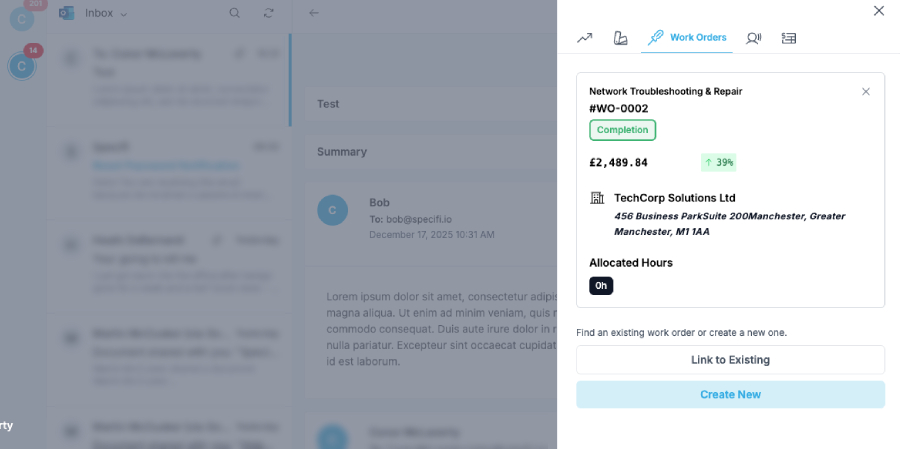
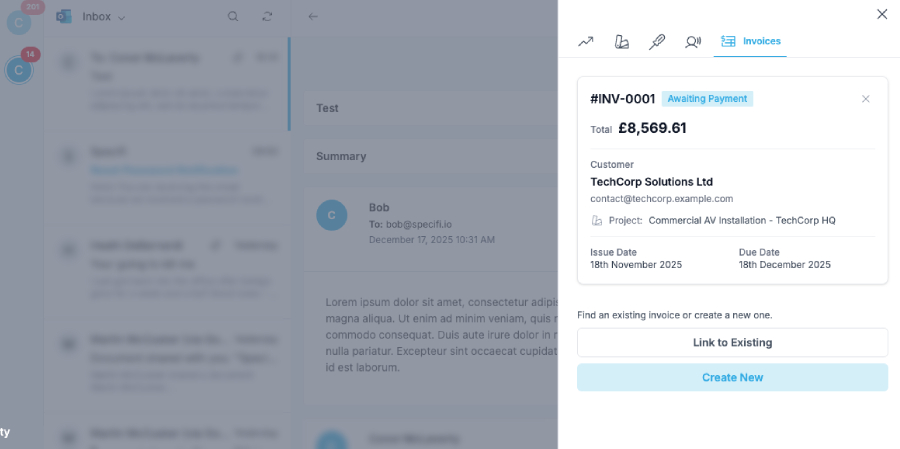
From the composer or thread view, create a new customer, opportunity, project, work order, invoice, referrer, or task in one click. Pre-filled from what the email already contains (contact, address, project context). Review, confirm, the record lands with the thread attached.

Auto-match contacts

Inbound emails match to existing CRM contacts on the from-address (and the to / cc addresses). New contacts created automatically when no match exists. The user does not have to forward, BCC, or copy anything to Specifi for it to land in the right place.

Templates and snippets

Reusable email templates with merge fields against the linked CRM record (deposit-acknowledged template auto-fills customer name, project address, deposit amount, next-steps date). Company-level templates carry brand consistency; user-level templates carry personal touches.

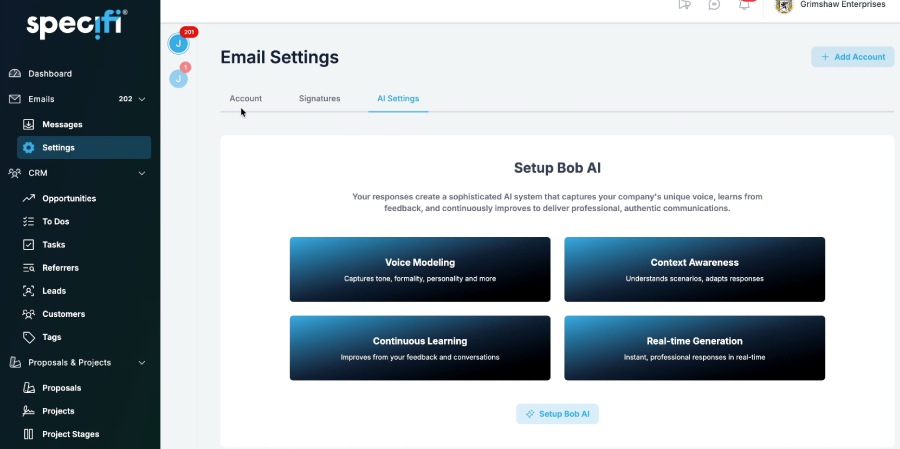
Bob the AI on email

Today: Bob drafts replies, summarises threads, and finds customers by email address; output is text in the chat for the user to send through the composer themselves. From 1 June: send_email and schedule_email ship with the canonical approval-gate flow (user sees draft, recipients, subject, attachments, clicks send or amend; Bob does not unilaterally send).

Shared team inbox

Configured per company. The shared inbox aggregates sales@, info@, and support@ addresses into a single team-visible queue. The user replying gets recorded against the thread (so the rest of the team does not double-respond). Retires the "Sarah is on holiday so the inbox just sits" failure mode.

Why integratorsmake the switch.

No context switch

Emails live where the work lives. Stop toggling between Outlook and the CRM at every reply. The thread is on the customer record, the project record, the work order record, the invoice record, and the activity feed; the conversation is wherever the rest of the team is already looking.

Nothing lost

Every thread tied to a contact, an opportunity, a project, a work order, or an invoice (or to several at once when the thread covers multiple records). Search once, find everything. The "did Sarah reply to that?" question retires; the reply is on the record where Sarah and the rest of the team are already working.

Bob does the drafting

Draft reminders, follow-ups, quote chases, thank-yous on demand from a plain-English prompt; today the user reviews and sends through the composer themselves, and from 1 June Bob sends with the user's approval through the canonical send_email approval-gate flow. The blank-reply-box paralysis at 5pm on a Friday retires.

Commonquestions

Contact us
Is email integration included?

Yes, on every plan. No separate email-integration SKU, no per-mailbox surcharge, no "email automation tier" gating the canonical capabilities. Individual, Team, and Company plans all carry the same email surface. The user connects their work mailbox once during onboarding (a one-click OAuth handshake with Gmail or Outlook 365), and the platform handles inbound auto-attach, outbound from inside Specifi appearing in their sent items, thread-linking against multiple records, create-from-inbox, and shared team-inbox surfaces from there.

Which providers does Specifi connect to?

Two: Gmail and Outlook 365 (formerly Microsoft 365 / Office 365 / Exchange Online). Both are LIVE today and use the same two-way OAuth handshake; behaviour is consistent across the two. Generic IMAP providers (a self-hosted mail server, an obscure SMTP-only host, your nephew's hosted-Roundcube setup) are NOT supported today. If your business runs on a non-Gmail / non-Outlook provider and the email integration is a hard requirement for your evaluation, raise it during the discovery call so the product team can prioritise against the rest of the integration roadmap; we are not committing a public ship date until the engineering team has validated which providers' OAuth surfaces support the canonical thread-linking + create-from-inbox flow we ship today.

Is the sync two-way?

Yes. The OAuth handshake permissions Specifi to read inbound mail (so the platform auto-attaches it to the right CRM record) and to send outbound on the user's behalf (so an email composed from inside Specifi appears in the user's Gmail / Outlook sent items the same way as if they composed it directly in those apps). Reply in Outlook? The reply shows up against the customer record inside Specifi the moment the next sync cycle picks it up. Reply from inside Specifi? The reply shows up in the user's Gmail / Outlook sent items, threaded against the original. The user's mailbox does not become a Specifi-only surface; their existing email habits keep working.

How does inbound auto-attach work?

When a new email lands in the user's connected mailbox, Specifi looks up the from-address (and the to / cc addresses) against the CRM contact directory. If a contact match exists, the email auto-attaches to the contact record and the matching opportunity, project, work order, or invoice if the contact is currently associated with one. If no contact match exists, the email lands in the user's "unmatched" tray (where the user can either create a new contact from the email in one click or dismiss the email as spam / out-of-scope). The auto-attach happens on the inbound side; the user does not have to forward, BCC, or copy anything to Specifi for it to land in the right place.

Can a single email thread link to multiple records?

Yes. A single thread can link to one or more existing customers, opportunities, projects, work orders, or invoices simultaneously. The link is bidirectional: the email shows on every record it's linked to, and every record's context shows on the email when the user opens it. This is the realistic shape of how AV-integrator email actually works: a single thread between the office and a long-standing customer might cover a closeout question on the project from last quarter, an invoice query on the open invoice, a service-call request that should spawn a new work order, and a referral the customer is considering. One thread, four records, three open and one closed; the user shouldn't have to fragment the conversation across four separate emails to keep their CRM tidy. Linking the thread to all four records keeps the conversation intact AND keeps the CRM useful.

Can I create a CRM record directly from inside an email?

Yes. From inside the email composer or thread view, the user can create:

- A new customer (from a lead's email signature or domain match) - A new opportunity (from a "we're looking at the project for the new building" enquiry) - A new project (from a confirmed-and-booked-in customer reply) - A new work order (from a service-call email or a site-issue thread) - A new invoice (from a "ready to bill the deposit" closeout email) - A new referrer record (from a partner introducing a prospect) - A new task (from a "can you also check the network configuration?" follow-up)

The create-from-inbox flow pre-fills as much of the new record as the email already contains (contact name, address, phone if it's in the signature, project context if the thread is currently linked to a project). The user reviews and confirms; the record lands inside the platform with the originating thread already linked to it. No copy-paste between the inbox and the CRM. This is the surface Matthew specifically called out in the editorial pass brief: "link to customers, invoices, projects, referrers, work orders or create all the same from inside your email and find the corresponding in the crm and all buckets".

What does the shared team inbox give me?

Configured per company. The shared inbox aggregates customer-facing email addresses (sales@, info@, support@) into a single team-visible queue, so every member of the office team can see what's come in, who's replying, and what's still open. The user who picks up an email is recorded against it (so the rest of the team doesn't double-respond), the conversation thread links to the right CRM record automatically when one matches, and a "needs follow-up" tag surfaces threads that have been read but not replied to. For a 5-person crew, this retires the "Sarah is on holiday so the sales@ inbox just sits" failure mode. For a 50-person company, this retires the "did anyone reply to the Acme thread or do they still need an answer?" Slack message that hits the office four times a day.

Are email templates and snippets supported?

Yes. Reusable templates with merge fields against the linked CRM record are supported (so a "thanks for the deposit" template auto-fills the customer's name, the project address, the deposit amount, and the next-steps date from the project surface). Templates are scoped per-user or per-company; the company-level templates carry brand consistency for customer-facing emails (the proposal-acknowledged email, the work-order-completed email, the invoice-overdue reminder), the user-level templates carry the personal touches each individual user wants (their preferred sign-off, a "calling back at..." holiday message, their stock answer to the "what does Specifi do?" question). Snippets are shorter reusable text blocks (a one-line standard greeting, a stock paragraph about delivery timing) that drop into a draft with a keyboard shortcut.

Can Bob the AI help with email?

Yes, today, on the read side. Per the canonical 04-bob-ai-capabilities.md table 8, Bob has three live email read tools:

1. **draft_email** - Bob drafts a reply or a new email from a plain-English prompt ("draft a follow-up to Acme on the open proposal asking when they'd like to schedule the rough-in"); the draft returns as text in the chat for the user to edit, copy into the email composer, or rewrite. Bob does NOT send the email; the draft is text-only output today.

2. **find_customer_by_email** - Bob takes an email address and returns the matching customer record (or all matching records if the address is on multiple). Useful for "who is jane@acme.com?" queries when the contact directory has dozens of matches by surname.

3. **get_linked_emails** - Bob lists the emails currently linked to a record. Useful for "show me everything we've heard from Acme on the new project" queries before a customer call.

The two write tools (send_email and schedule_email) ship 2026-06-01. send_email is classified EXTERNAL in the canonical safety architecture, which means Bob always pairs the action with explicit user approval before the message leaves Specifi (the user sees the draft, the recipient list, the subject, the attachments, and clicks "send" or "amend"; Bob does not unilaterally send mail). schedule_email follows the same approval-gate pattern with the additional schedule-confirmation step. From 1 June, "Bob, send a follow-up to Acme on the open proposal" becomes a one-prompt flow that ends in the user clicking the approval card; today, the user copies the draft text into the email composer themselves.

Is email-thread data private to my account?

Yes. Email-thread data lives in the customer's tenant; it is never shared with other Specifi customers, never used to train external models, never aggregated into a multi-tenant analytics surface. The OAuth handshake permissions Specifi to read the user's inbound mail and send outbound on their behalf for the canonical sync flows; permissions can be revoked at any time from the user's Gmail / Outlook account settings, and revoking permissions cleanly disconnects the integration without losing the historic email-to-record links that are already in the platform.

Where Bob the AI's email tools (draft_email, find_customer_by_email, get_linked_emails) operate, the same multi-tenant isolation applies: Bob's responses are scoped to the calling user's tenant and the calling user's role-based permissions inside that tenant. A user without permission to read a particular customer record cannot use Bob to query the email thread linked to that record either.

What if I run a non-Gmail, non-Outlook mailbox?

Two paths today, neither a direct integration:

1. **Mail forwarding.** Forward the relevant addresses to a Gmail or Outlook 365 inbox that IS connected to Specifi; the inbound auto-attach picks them up the same way it picks up directly-received mail. The from-address remains the original sender's, so the auto-attach matches the right contact. This is the path most non-Gmail / non-Outlook customers use today.

2. **Manual log.** A user can log a call or a meeting against a customer record, paste in the email body if needed, and the activity-feed surface treats it as a logged interaction the same way it treats a synced email. This is the more manual fallback if mail forwarding isn't an option.

If the non-Gmail / non-Outlook mailbox is a hard requirement and a direct integration would change the buying decision, raise it during discovery so the product team can prioritise; the canonical 02-integrations.md does NOT carry a public ship date for additional providers today.

Will my outbound emails look like they came from Specifi?

No. Emails composed inside Specifi go out from the user's connected Gmail or Outlook account, with the user's signature, with the user's "from" address, and through the user's own SMTP send (via the OAuth permission). The recipient sees an email from sarah@yourdomain.com, not from sarah@notifications.specifi.io or anything similar. Outbound mail composed inside Specifi is indistinguishable from outbound mail composed directly in Gmail / Outlook from the recipient's side; reply paths route correctly back to the user's mailbox AND back into Specifi.

What does email integration cost?

Nothing extra. Included on every Specifi plan. No per-mailbox fee, no separate sales-inbox SKU, no shared-team-inbox upgrade tier, no Bob email-tool surcharge. The OAuth handshake to Gmail or Outlook 365 is free on Specifi's side; the customer's Gmail or Outlook 365 subscription cost remains whatever the customer is already paying their email provider directly.

They switched. Theyhaven't looked back.

500+Used by integrators globally
Specifi is an amazing software that literally runs our business operations. From initial proposals, sales and CRM to team and project management, invoicing & generating purchase orders. I would definitely recommend Specifi to anyone running a small to medium size audio visual or electrical company that wants a simple to use software that gets the business organised and looking super professional.
James BrownThe Cinema Company

Ready to see it?

30-minute demo. No slides. No fluff.

Explore pricing